A calorie counter that covers the whole day
Log food from a photo, a sentence or a barcode, then track calories and macros alongside weight, steps, water and fasting — on one screen, on your phone, for free.
Photo, description, barcode, or a saved favourite.
Calories, macros, weight, steps, fasting and water.
No locked features and no trial countdown.
A clearer download fit.
- You want one app for the whole day, not a calorie counter plus three others for weight, steps and water.
- You have abandoned a tracker before because logging every meal by hand got tedious.
- You would rather your food diary sat on your phone than in someone else’s database.
- You are not willing to pay a subscription before finding out whether the habit sticks.
Why this app earns the install.
The honest question before any download is what this does better than what you already have. Here is the answer, without the marketing detour.
Logging that does not depend on a food database
Most counters make you search a list for everything you eat. Here you can photograph the plate, describe it in a sentence, or scan a barcode — and the database search is the fallback, not the whole experience.
The estimate arrives itemised, not as one number
A photo comes back split into ingredients with individual calories and macros, plus a stated confidence level. You can adjust any portion or overwrite the totals before saving. Nothing is hidden behind a single figure you have to accept.
Calories are only part of the day
Weight with progress photos, eleven body measurement sites, steps from Apple Health or Health Connect, water and an intermittent fasting timer all live in the same app, on the same home screen.
It works with no signal, and it costs nothing
Your log lives on your phone, so a plane or a basement gym changes nothing. There is no subscription to use it and no locked features, and you can export the whole thing as a backup file whenever you like.
The day on one screen, and everything behind it.
Six cards cover the day — calories, macros, weight, steps, fasting and water — and each opens into its own history. Underneath them, a single timeline holds the meals, drinks and weigh-ins you logged, in the order they happened.
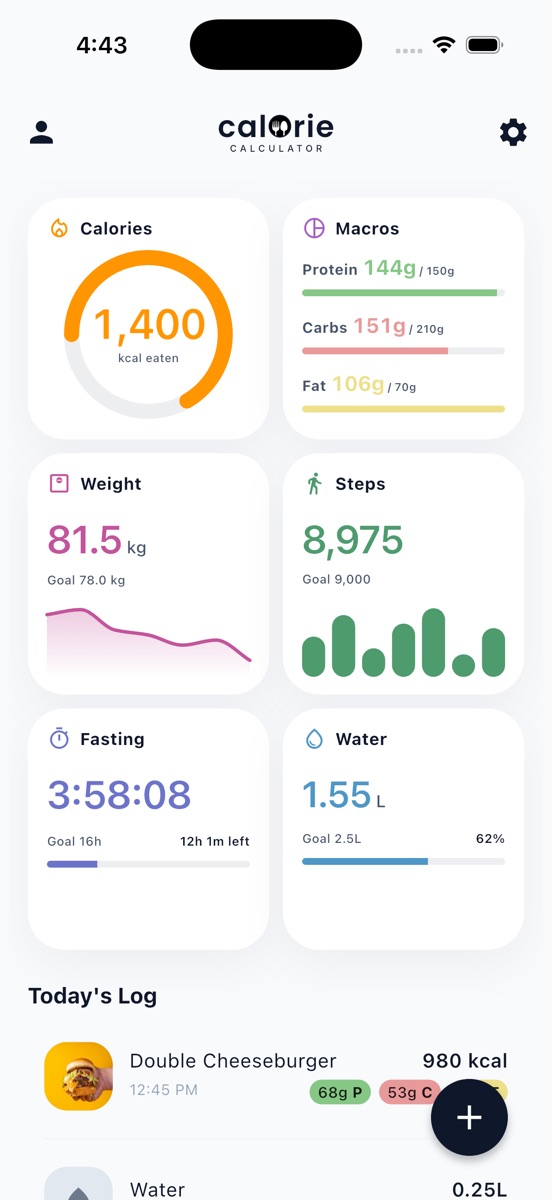
Photo logging with AI
Photograph the plate. The app returns the dish split into ingredients, each with calories and macros, plus a confidence note telling you how much to trust it. Every line is editable, and portions adjust with plus and minus.
- Ingredient breakdown
- Confidence shown
- Fully editable
Describe it in words
No photo to hand? Type "2 slices of pepperoni pizza" and get an estimate. Adding portion sizes and preparation details sharpens it.
- Plain language
- No search needed
Barcode scanning
Scan a packet and pull its nutrition from the Open Food Facts database. Results are cached on the device, so a product you have scanned before still resolves with no signal.
- Open Food Facts
- Cached offline
Favourites and manual entry
Save the meals you eat every week and re-log them in a tap, or type the numbers yourself when you already know them.
- One-tap re-log
- Manual totals
Three steps, still light.
Tracking only pays if it survives a bad week, so the daily loop is deliberately short.
Pick the right app angle.
No app suits everyone. Here is where this one fits, and where it does not.
The AI gives you a good estimate in seconds and tells you how confident it is. If your standard is weighing every ingredient on a scale, that route is still here through manual entry — but it is not what the app optimises for.
Calories alone rarely explain a stalled week. Weight, steps, water and fasting sitting next to them usually do.
There is no shame mechanic and no confetti. Log what you log, look at the trend, adjust. If you want an app that pushes you daily, this is not that app.
Common questions.
What should a good calorie counter app do?
Make logging fast enough that you still do it on a bad day, be honest about how accurate its estimates are, and show you the trend rather than just today. Everything else is decoration.
Does it work for weight loss and for maintenance?
Both. You set a daily calorie and macro goal — worked out from your profile, or entered yourself — and the app tracks against it. For planning that goal, the site has free TDEE and calorie-deficit calculators.
Is the app available for iPhone and Android?
Yes, on both, through the App Store and Google Play.
Can I track macros too?
Yes. Protein, carbs and fat each get their own daily target and progress bar, and every logged food carries its macro split.
What else does it track besides food?
Weight with front, side and back progress photos, eleven body measurement sites, steps read from Apple Health or Health Connect, water, and intermittent fasting with a live timer.
Does it need an account?
No. Everything works without one. An account is optional and exists only so your data can follow you to a new phone.