
Free, including the parts other apps charge for
AI photo logging, barcode scanning, macro targets, weight and progress photos, steps, water and fasting — all in the free app, with no subscription to use it, no trial countdown and no account required.
No locked features and no trial clock. Ads pay for it.
Every feature works without signing up.
JSON backup and a photo archive, on request.
A clearer download fit.
- You have been burned by a "free" tracker that locked macros or scanning behind a subscription.
- You want to find out whether the habit sticks before anyone asks you for money.
- You want your data to be portable, so leaving later is not a punishment.
- You would rather not hand your food diary to a company that monetises it.
Why this app earns the install.
The honest question before any download is what this does better than what you already have. Here is the answer, without the marketing detour.
The features people usually paywall are free here
AI photo logging, barcode scanning, macro targets, weight trends, progress photos, body measurements, steps, water and the fasting timer are all in the free app. There is no premium tier holding the useful half hostage.
No trial countdown
Nothing expires after seven days. The app is not a demo of a paid product, so there is no clock running while you decide whether tracking suits you.
No account required
You can use every feature without signing up. Sync exists if you want your data to follow you to a new phone, but it is opt-in, and the account can be deleted with its data whenever you ask.
Your data can leave with you
Export the whole log as a JSON backup and restore it elsewhere, and export your body photos as a separate archive. Free should not mean trapped.
The day on one screen, and everything behind it.
Six cards cover the day — calories, macros, weight, steps, fasting and water — and each opens into its own history. Underneath them, a single timeline holds the meals, drinks and weigh-ins you logged, in the order they happened.
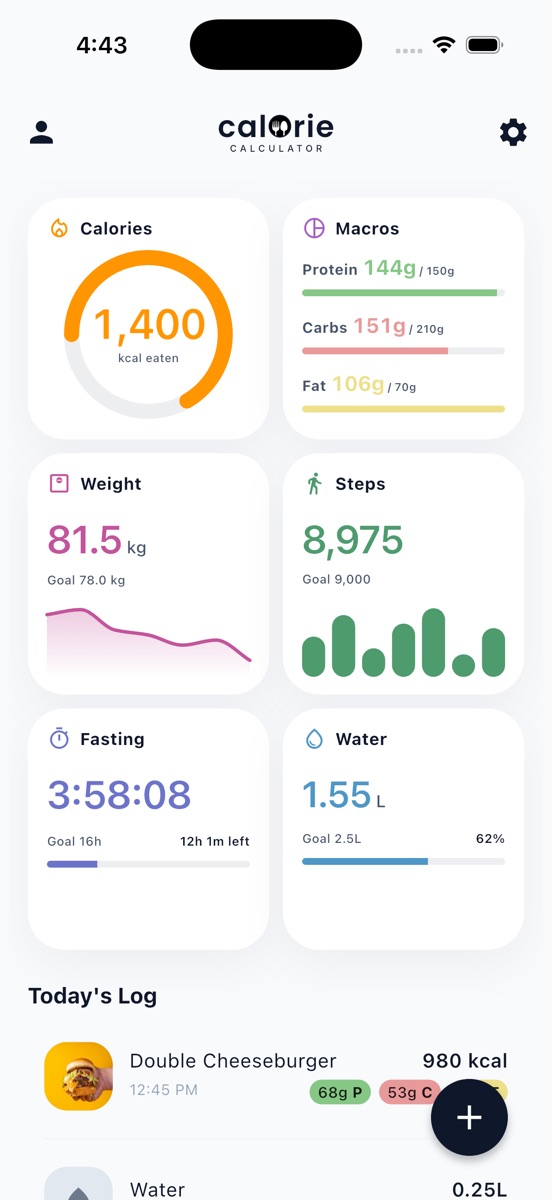
Photo logging with AI
Photograph the plate. The app returns the dish split into ingredients, each with calories and macros, plus a confidence note telling you how much to trust it. Every line is editable, and portions adjust with plus and minus.
- Ingredient breakdown
- Confidence shown
- Fully editable
Describe it in words
No photo to hand? Type "2 slices of pepperoni pizza" and get an estimate. Adding portion sizes and preparation details sharpens it.
- Plain language
- No search needed
Barcode scanning
Scan a packet and pull its nutrition from the Open Food Facts database. Results are cached on the device, so a product you have scanned before still resolves with no signal.
- Open Food Facts
- Cached offline
Favourites and manual entry
Save the meals you eat every week and re-log them in a tap, or type the numbers yourself when you already know them.
- One-tap re-log
- Manual totals
Three steps, still light.
Tracking only pays if it survives a bad week, so the daily loop is deliberately short.
Pick the right app angle.
No app suits everyone. Here is where this one fits, and where it does not.
The app carries advertising, and the settings screen includes ad privacy choices you control. That is the trade — not your food diary being sold on.
This is not a stripped calorie log. It covers food four ways in, six daily metrics, a full history view for each of them, data export, and fifteen themes with a proper editor behind them.
There is no coach, no meal plan service and no human support tier to buy. If those are what you are shopping for, a paid tracker will serve you better.
Common questions.
Is Calorie Calculator actually free?
Yes. Every feature described across this site is in the free app, including the AI photo analysis. There is no subscription to use it, no locked features and no trial countdown. Ads pay for the app, and watching one is never what unlocks a feature.
Are there limits on AI scans?
No per-scan credit system to buy your way past. Photo and description analysis are part of the free app.
How does a free app pay for itself?
Through advertising, which is disclosed when you first set the app up, and which you can adjust through the ad privacy choices in Settings. Your food logs are not the product being sold.
Do I need to create an account?
No. Everything works without one. Signing in is optional and only exists so your data can move to a new phone, and you can delete that account and its data at any point.
Can I get my data out?
Yes. Settings can export your whole log as a JSON backup you can restore on another device, and your body photos as a separate archive.
What happens to my data if I stop using it?
It stays on your device unless you delete the app. If you created an account, you can request its deletion from within the app or from the delete-account page on this site.