Photograph the plate. Get the ingredients back.
One photo returns the dish split into ingredients — calories, protein, carbs, fat and gram weight for each, with a confidence level attached. Adjust anything before it counts.
Before you eat or halfway through; any angle.
Calories, macros and grams for each component.
Analysed for the estimate, then discarded.
A clearer download fit.
- You will log a meal if it takes one photo, and you will not if it takes six database searches.
- You eat out, eat home cooking, or eat things no packet ever described.
- You want to check the estimate before it counts, not after.
- You have a camera roll full of meals already and would rather that effort produced something.
Why this app earns the install.
The honest question before any download is what this does better than what you already have. Here is the answer, without the marketing detour.
One photo, any angle
Take it before you eat or halfway through. The app identifies the dish and its components, so you are not describing a plate one ingredient at a time.
A hand in frame gives a better portion estimate
Scale is the hard part of reading a photograph. When the app finds a size reference such as a hand or a fist, it says so and the portion estimate improves accordingly.
Correct the photo without retaking it
If the analysis missed something, describe the dish in the re-analyse box and it runs again with your correction. Usually faster than editing numbers by hand.
The photo does not stick around
A meal photo goes out only to produce the estimate and is discarded afterwards. What stays is the nutrition data, on your device.
The day on one screen, and everything behind it.
Six cards cover the day — calories, macros, weight, steps, fasting and water — and each opens into its own history. Underneath them, a single timeline holds the meals, drinks and weigh-ins you logged, in the order they happened.
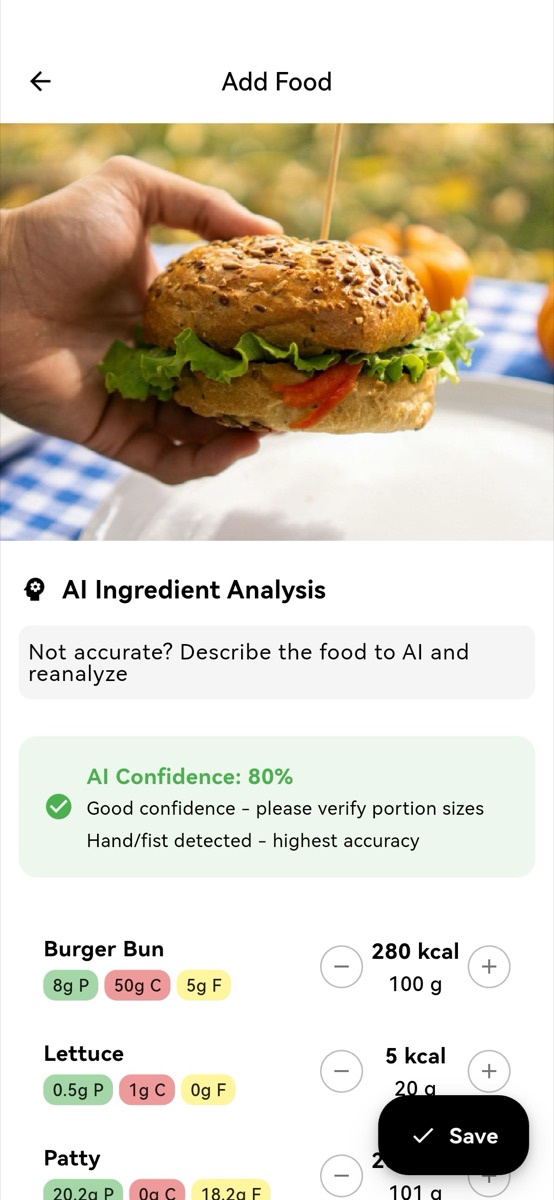
Photo logging with AI
Photograph the plate. The app returns the dish split into ingredients, each with calories and macros, plus a confidence note telling you how much to trust it. Every line is editable, and portions adjust with plus and minus.
- Ingredient breakdown
- Confidence shown
- Fully editable
Describe it in words
No photo to hand? Type "2 slices of pepperoni pizza" and get an estimate. Adding portion sizes and preparation details sharpens it.
- Plain language
- No search needed
Barcode scanning
Scan a packet and pull its nutrition from the Open Food Facts database. Results are cached on the device, so a product you have scanned before still resolves with no signal.
- Open Food Facts
- Cached offline
Favourites and manual entry
Save the meals you eat every week and re-log them in a tap, or type the numbers yourself when you already know them.
- One-tap re-log
- Manual totals
Three steps, still light.
Tracking only pays if it survives a bad week, so the daily loop is deliberately short.
Pick the right app angle.
No app suits everyone. Here is where this one fits, and where it does not.
Exactly the meals a food database handles worst are the ones a photo handles best.
A label already carries real numbers. Scanning pulls them from Open Food Facts, which beats estimating from a picture of the box.
Photo portion estimates are approximations, and the app says as much with a confidence level on every analysis. If a meal has to be exact, weigh it and enter it manually.
Common questions.
How do I count calories from a photo?
Open the app, press the plus button, choose the camera, and photograph the meal. The analysis comes back as a list of ingredients with calories, macros and gram weights, plus a confidence level. Adjust anything that looks wrong, then save.
How accurate is it?
It is an estimate, and the app tells you how confident it is rather than presenting a single number as fact. Fill the frame with the food, use decent light, and include your hand for scale — that combination gives the best results.
Can I edit what the photo analysis returns?
Yes, all of it. Portions adjust with plus and minus, ingredients can be deleted, and the calorie and macro totals can be typed over directly. Nothing is saved until you confirm.
What if I have no photo?
Describe the meal in plain language and the app estimates from that instead. Barcode scanning, saved favourites and manual entry are all there too.
Are my food photos stored anywhere?
No. The photo is used to produce the estimate and then discarded. Body progress photos are separate and never leave your device at all.